




Sign Up and Login
What is the difference between the country I reside in versus the country my care will take place? Why was I asked this when I first opened MyHealth360?
The country where your care will take place enables MyHealth360 to provide you with services available in that country.
How do I start receiving reminders for my appointments made via MyHealth360?
To start receiving reminders for your appointments, you may sign in with your MyHealth360 account and tap on Settings > Marketing Consent, and toggle the necessary options.
How can I share my medical records?
You may view and download your medical reports through Access Medical Records in the app. These reports may then be shared with others at your discretion.*
*Update (effective July 2025): The download and sharing functions for radiology images and reports will be temporarily unavailable until further notice.
If you require assistance with downloading your radiology DICOM images, contact us at +65 6812 6499 or email us at MyHealth360sgSupport@ihhhealthcare.com.
How is my data shared across IHH Healthcare’s providers?
For inquiries regarding personal data, please review our MyHealth360 Data Privacy Policy. For information regarding medical data usage, please review our Terms and Conditions.
How do I delete my account?
We are sorry to see you go. Please get in touch with us at +65 6812 6499 for us to help you delete your account.
How is MyHealth360 related to IHH Healthcare?
- Mount Elizabeth Hospital
- Mount Elizabeth Novena Hospital
- Gleneagles Hospital
- Parkway East Hospital
- Parkway Shenton
- Parkway MediCentre
- Parkway Laboratory
- Parkway Radiology
Powered by IHH Healthcare MyHealth360 is a mobile app that gives patients access to their medical records across these facilities through one single platform.
I did not receive an SMS OTP when registering for my account / updating my particulars. What should I do?
You should be able to receive SMSes from MyHealth360 if your telecom provider is based in one of the following countries: Brunei, China, India, Malaysia, the Philippines, Singapore, Turkey, Vietnam, Cambodia, Hong Kong, Indonesia, Laos PDR, Myanmar, or Thailand. We are actively working to expand our reach and hope to include more countries in the future.
In the event that you able to receive SMS OTP but the SMS OTP did not reach you after the second request, a voice OTP option will be made available. Tap on the 'call me with an OTP' option to receive your voice OTP.
Is there an option for email OTP (one-time password) besides SMS OTP during login?
Yes, you have an option to receive an email OTP. Simply tap on Settings>Security and Login >Enable Email OTP>Send verification email and follow the steps required to activate email OTP.
Do I need to log out manually for security reasons?
We recommend users to log out after each session to safeguard account security.
Can I access MyHealth360 on a modified device?
No. MyHealth360 cannot be accessed on devices that have been jailbroken or otherwise modified in ways that affect the device’s security. This helps protect your personal and health information.
TeleConsultation
The TeleConsult call was prematurely terminated due to a bad network connection. How do I get reconnected?
Where and when can I retrieve my TeleConsult receipt, referral letter, or e-MC after the TeleConsultation?
After payment is made for your TeleConsultation, you will be notified via SMS and MyHealth360 app push notifications to view your TeleConsult summary. The summary may consist of receipts, doctor’s memos and/or referral letters and e-MCs. Alternatively, you may tap on “Medical Records” to access the TeleConsult summary at any time.
Are e-MCs only available with TeleConsultation?
e-MCs are available on the app for both walk-in clinic visits at Parkway Shenton as well as TeleConsultations via the MyHealth360 mobile app.
How will my dependents and my personal MyHealth360 accounts be affected if my dependents create individual MyHealth360 accounts?
When you add a dependent to your account, all TeleConsult sessions for your dependent will be recorded under your account. You will have access to your dependents' TeleConsultation records in your MyHealth360 account. Should your dependents create their individual MyHealth360 account, all TeleConsult sessions completed under their respective personal accounts will only be available there.
How do I pay for a TeleConsult?
After your TeleConsult video session ends, you will be notified through an SMS, or push notification to make payment. Please follow the instructions on the SMS and the MyHealth360 app push notification.
How are refunds handled?
Refunds are handled on a case-by-case basis. For services already rendered, there will be no refunds available. For assistance, please contact us at MyHealth360sgSupport@ihhhealthcare.com.
What are the operating hours for TeleConsult
What conditions are suitable for TeleConsult?
In an emergency, we strongly advise seeking immediate assistance at the nearest Accident and Emergency (A&E) department.
What do I need to prepare before a TeleConsult?
What is the minimum age for which TeleConsult is suitable?
How do I receive my medical certificate?
Is it possible for the patient to decline medication during the TeleConsultation?
What is the cut-off time for medication dispensing?
What are the fees for TeleConsultation?
What is the payment process for TeleConsultation?
How do dependents enjoy the corporate rates (when applicable)?
What should I do if I encounter any issues while using TeleConsultation?
Healthier SG
What is Healthier SG?
Who is eligible to enrol in Healthier SG?
If you are:
- Age 40 and above
- A Singapore citizen or permanent resident (PR)
You will receive an SMS from the Ministry of Health inviting you to enrol with a Healthier SG clinic or polyclinic through the HealthHub app. Singapore Citizens and Permanent Residents born in 1984 will receive this SMS gradually.
For a step-by-step guide on how to enrol with Parkway Shenton using the HealthHub app, please see the FAQs here.
What does Healthier SG cover?
By enrolling in the Healthier SG programme, you can enjoy subsidies for health screenings, vaccinations, and medical treatments at our Parkway Shenton and Parkway MediCentre Healthier SG-registered clinics.
Why enrol with Parkway for Healthier SG?
Enrolling with Parkway Shenton for Healthier SG allows you to enjoy these benefits:
- Automatic enrolment in our Parkway Plus programme, which gives you enhanced benefits for accessible and affordable preventive care.
- Convenient GP services at over 30 Parkway Shenton and Parkway MediCentre clinics islandwide or via TeleConsult.
- If follow-up care is needed, access over 1,500 multidisciplinary specialists from Gleneagles, Mount Elizabeth and Parkway East Hospitals.
How do I start receiving reminders for my Healthier SG appointments via the MyHealth360 app?
To enable reminders for your appointments, sign in to your MyHealth360 account and tap on Settings > Marketing Consent, and toggle the necessary option.
Can I reschedule my Healthier SG appointments made via MyHealth360?
Yes, you can reschedule your appointments up to 2 days before the scheduled appointment.
What should I do if I require assistance with Healthier SG matters?
For enquiries or assistance with Healthier SG matters, please call our Healthier SG helpline at 6233 9620.
Appointment Bookings
What are the types of appointments available with MyHealth360?
You can now make appointments via MyHealth360.
For corporate clients, please refer to MyHealth Wallet for your Corporate Program to view panel listings and make bookings.
Available appointments includes:- GP services
- TeleConsultations
- Health screenings
- Specialists services
- Maternity tours
- Healthier SG health plan
What is the difference between setting reminders in My Health Planner and Booking appointments with Specialists and GP, and Healthier SG?
My Health Planner functions as a health buddy for preventive healthcare matters such as vaccination and health screening appointments. MyHealth360 offers recommendations on relevant healthcare services tailored to your lifestyle.
Booking an appointment for Healthier SG health plan refers to your health plan consultation at your enrolled Healthier SG clinic. During this session, your doctor will work with you to co-create a personalised health plan. Your first consultation is free and rewards you with bonus Healthpoints on the Healthy 365 app.
Services and reports
You can now access your medical records from IHH Healthcare directly on MyHealth360.
For Outpatients
Can the information, services and tools (including but not limited to the medical records functionality) made available to me on this app, be treated as medical advice?
No, the information, services and tools made available to you on MyHealth360 are not intended to be used as medical advice, diagnosis or a recommendation regarding starting (or ceasing) a particular treatment plan. It should not be used in an emergency and is not intended as a substitute for any medical professional. Services provided by the third parties, including the Healthcare Service Providers, are independent from the Services of the App and are outside of our control.
Can I access a family member's test results?
No. This feature would be made available in the future. Results for family members (elderly parents or children) will have to be accessed separately using their registered mobile number.
When will my laboratory results be available?
Not all lab results will be available on MyHealth360 mobile app — only selected outpatient results will be included. It will take at least 1 – 14 working days for these results to be available on MyHealth360 after your visit. You will receive a SMS or app push notification once your results are available on MyHealth360. Please consult your doctor to understand your results. If you did not receive your results within 15 working days, please contact your doctor or our call centre at +65 6812 6499 for further assistance.
When will my radiology report be available?
It will take at least 1 – 4 working days for your radiology results to be available on MyHealth360 after your visit. You will receive a SMS or app push notification once your results are available on MyHealth360. Please consult your doctor to understand your report. If you do not receive your report within 5 working days, please contact our call centre at +65 6812 6499 for further assistance.
How do I view my radiology reports in the app?
Effective July 2025:
- To view your radiology reports dated August 2023 and later:
- Tap View Result and select the report you wish to view.
- For reports dated before August 2023:
- Tap View Result.
- Tap the Action button.
- Tap the > arrow symbol until the Download button appears.
- Tap the Download button.
- The report will then be displayed.
If you encounter any issues, contact us at +65 6812 6499 or email us at MyHealth360sgSupport@ihhhealthcare.com for further assistance.
Why can’t I view results after receiving the push notification?
Why aren’t all my laboratory results available after logging in?
We are availing laboratory results that are meaningful to patients. For example, cholesterol levels in Lipid Profiles that patients can trend over the app. The laboratory results will be updated in chronological order, with the most recent ones first. Previous laboratory results will be made available in future versions of MyHealth360.
Can I request my medical certificate from the Urgent Care Centre (UCC)?
Yes, you can do so via the MyHealth360 app by submitting a request for medical records. Start by selecting the relevant hospital visit under Records, followed by “Request for medical records”. In the free-text field, indicate that you would like to request a medical certificate from the UCC.
Can I request a medical report and/or records from a specialist clinic through MyHealth360?
No. Medical reports are prepared by the specialist, and the hospitals do not keep records of clinic notes. You may contact your specialist clinic directly for such requests.
For Inpatients
Can I access my medical records while I’m still warded in Parkway hospitals?
For radiology reports:
Yes. Regardless of where you are, if you have registered on MyHealth360, and have elected to receive app push notifications, you will typically receive a MyHealth360’s push notification to access your radiology reports in MyHealth360 around 3-4 working days after your reports are available in MyHealth360. The availability of your radiology report on MyHealth360 is subjected to the readiness of the finalized reports by our radiologists. Radiologist may take some time to finalize a report as certain cases are more complex. Typically, it takes at least 3 working days for your reports to be accessible via MyHealth360. If you do not receive your report via MyHealth360 after 7 working days, please contact our call centre at +65 6812 6499 to inquire about the status of your report.
For Laboratory results:
Do note that for all inpatient laboratory results , i.e., laboratory tests taken when you are warded in any IHH Healthcare Singapore hospitals, will not be accessible via MyHealth360.
After discharge, you may request for your inpatient medical records through the Medical Records Office (MRO). See “Can I access my medical records from a previous admission?” below for more information.
Can I access my interim hospital bills while I’m still warded in Parkway hospitals?
No. MyHealth360 will only reflect the final summarised bill after a patient is discharged. Please check with our hospital colleagues should you need to view your interim bills.
Can I access my medical records from a previous admission?
Medical records from previous admissions cannot be viewed directly in the app. However, you can submit a request by selecting the relevant hospital visit under the Records tab, tapping “Request for medical records”, and following the steps to complete your request.
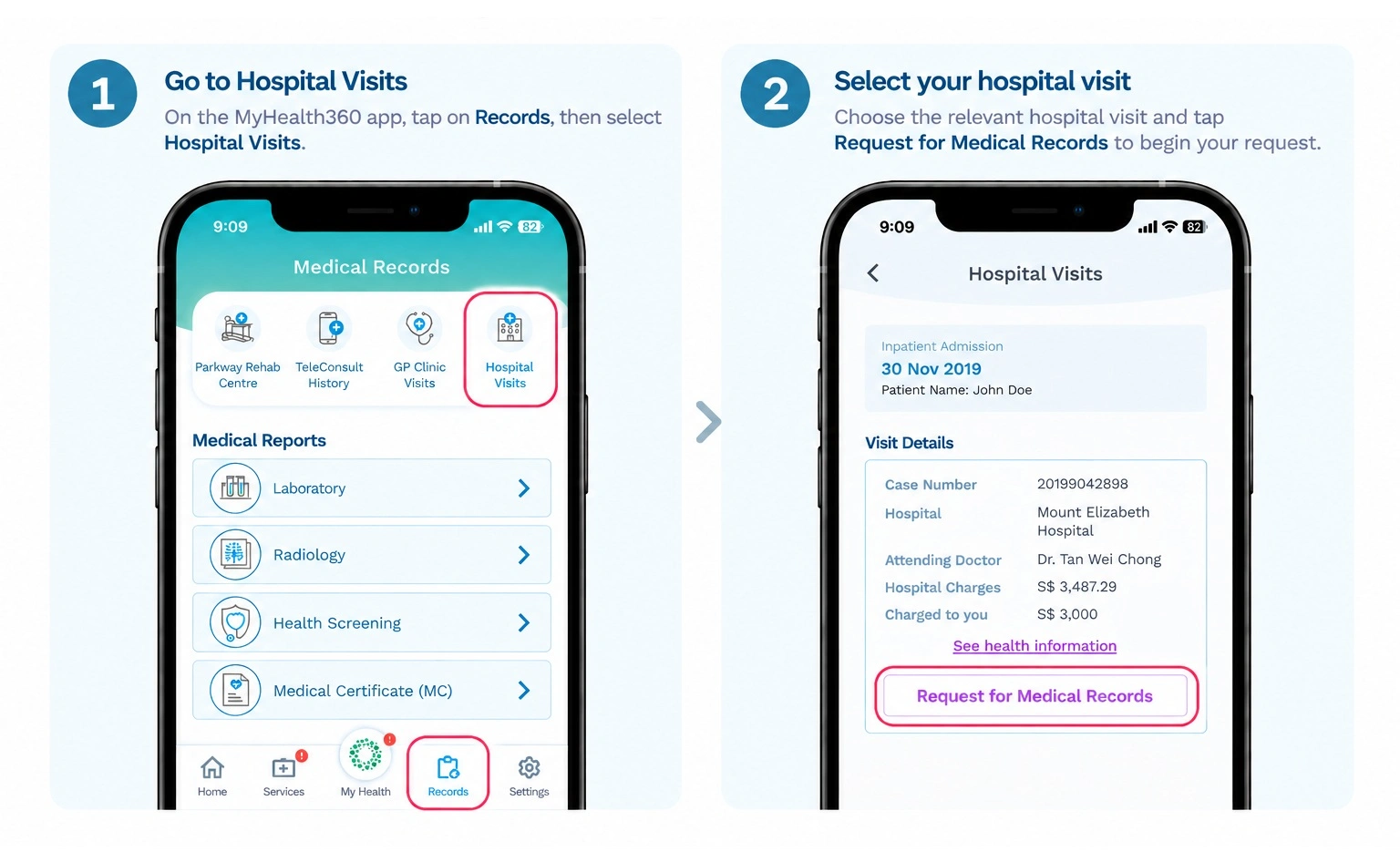
Your requested medical records may be sent to you by email or mail, or collected in person from our Medical Records Office (MRO). See our location and contact details.
Can I request inpatient medical record on behalf of someone else?
No. You can only request your own medical records for data protection and confidentiality reasons. If you require documents for another person, please contact our Medical Records Office directly.
Can I authorise someone to collect my inpatient medical records on my behalf?
Yes. When submitting a “Request for medical records”, you will be asked to provide the authorised person’s details and a copy of their NRIC for verification.
Can I request inpatient medical records from different IHH Singapore hospitals in one application?
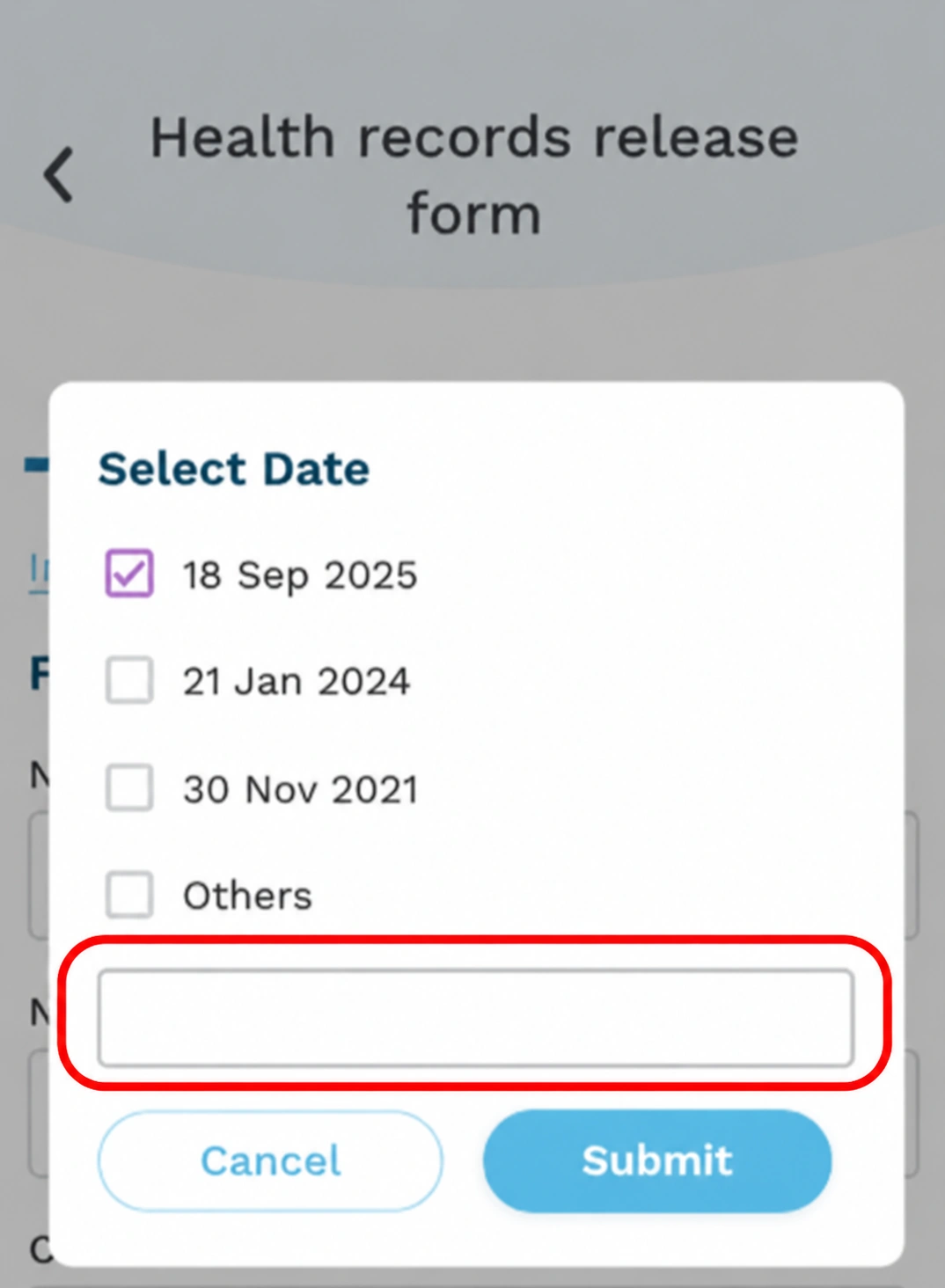
Yes. When submitting a “Request for medical records”, please indicate the admission period or date and the corresponding IHH Singapore hospital in the free-text field if you would like to request records from more than one hospital.
How soon will I receive my inpatient medical records?
It will take about 5 working days, depending on the type of request.
How do I make payment for my inpatient medical records request?
Currently, payment will need to be made in person at the respective hospital lobby. Other payment options may be introduced in the future.
Who can I contact regarding my inpatient medical record request?
For further enquiries about your request, please contact the Medical Records Office (MRO) of the respective hospital.
| Gleneagles Hospital 6A Napier Road Singapore 258500 Tel: +65 6470 3450 Email: SG.GEH.MRO@gleneagles.com.sg | Mount Elizabeth Hospital 3 Mount Elizabeth Singapore 228510 Tel: +65 6731 2237 Email: SG.MEH.MRO@mountelizabeth.com.sg |
| Mount Elizabeth Novena Hospital 38 Irrawaddy Road Singapore 329563 Tel: +65 6933 0497 Email: SG.MNH.MRO@mountelizabeth.com.sg | Parkway East Hospital 321 Joo Chiat Place Singapore 427990 Tel: +65 6340 8646 Email: SG.PEH.MRO@parkwayeast.com.sg |
Operating Hours:
Monday – Friday: 8.30am – 5.30pm (last walk-in request at 5.00pm)
Closed on Saturday, Sunday & Public Holidays
MyHealth Wallet
What is MyHealth Wallet?
MyHealth Wallet is a personalized, one-stop mobile application for employees of companies served by Ixchange Pte Ltd (https://www.ixchange.com.sg/). It allows employees to view and monitor their healthcare expenditure, transaction history, and submit claims online. The e-Card and Clinic Locator functions provide easy access to medical care wherever they are.
For more information, please visit https://www.ixchange.com.sg/solutions/digital-tools. Please check with your HR department if your company is served by Ixchange Pte Ltd, and whether you have an account with Ixchange.